Agile Software Design: Fast, Fun, and Future-Proof
The Secret Sauce to Agile Development Part 7
30 years of experience getting it right distilled into my new blog!
Isn’t that sort of stuff anti-agile and, in fact, a load of old hat, granddad?
Hello and welcome to the blog today, where I’ll be waffling on about software design.
You what? What’s that I hear you say, software design? Isn’t that something that Noah used to do back in the days of waterfall development and carving runes on stones?
Lots of companies and teams have gone to the Agile Manifesto and read the bit that says ‘we promote working software over comprehensive documentation’. Somehow, perhaps due to the strength of the coffee or the lateness of the night, this has been translated into ‘forget about software design, let’s pile on in and start writing the code’. Many, many times over the years, I’ve heard people say, ‘We’re agile now, so we don’t do things like software design, it’s not very agily is it?’
These people are doomed to a lifetime of refactoring, technical debt, and never delivering on time.
Software design is very quick and easy to do, and it produces diagrams that facilitate understanding of what we are going to build. It therefore supports collaboration, and it's especially good when someone needs to onboard onto an existing project, as they can quickly and easily see how the software is supposed to work. Here’s a fun exercise, especially if you are a design nay-sayer, truck over to the Agile Manifesto and see how many of the pillars and principles that design tick off.
In particular, I like this one: Continuous attention to technical excellence and good design enhances agility.
Software design is the very soul of agile development.
Besides all that, it’s fun!
So why do we need software design?
First and foremost, let’s tackle the big question of AI. Surely with AI, where we are going to generate all the code anyway, we don’t need to be doing software design? Now, there are many arguments to bring to the contrary, but I’m just going to present what, in my opinion, is the biggest one.
Remember the prototype solution that we generated back in Blog 4 for Charlie Bluster’s coin shop? It took about 30 seconds of hard prompting, and our AI assistant, CoPilot, kindly spat out the entire application for us, job done right? You may also remember that there were several issues with the application when we put it in front of our virtual, cross-functional team.
Here’s CoPilot’s assessments of the output from our virtual team:
The AI-generated app is functional but structurally fragile, with weak state management, no automated testing, potential security holes, performance bottlenecks, and a database model that could easily drift out of sync. It would be painful to maintain, risky to deploy, and expensive to support.
1. Fragile Front-End Architecture
- No framework (React/Vue/etc.), meaning state management will quickly become chaotic—especially for coin balances, reviews, and API coordination.
- Lacks modular structure, making the codebase harder to scale or maintain.
2. Insufficient Testing
- No automated unit or integration tests around the REST endpoints.
- Would be difficult to validate behaviour or catch regressions without adding a proper testing setup.
3. Security Gaps
- Review data could be forged or manipulated if not validated properly.
- Coin awards are vulnerable to abuse without rate limiting or verification checks.
4. Performance Risks
- Coin calculations may require transactions or batched writes—the current approach could choke under load.
- No caching strategy for coin balances, increasing read/write pressure.
5. Accessibility Issues
- Missing semantic HTML and ARIA labels.
- Keyboard navigation not considered—problematic for a gamified interface
6. Database Structure Concerns
- Collections not clearly separated (users/products/reviews/transactions).
- Coin balance storage risks data drift if not handled transactionally.
7. Build & Release Limitations
- No bundler (like Vite), making optimisation and scaling harder.
- No versioning strategy for review logic or coin rules.
8. Infrastructure Fragility
- Needs proper local emulation for functions and auth.
- CORS and redirect handling not fully addressed.
In summary, the prototype looks simple on the surface, but under the hood it has several structural and architectural weaknesses that would make it risky to ship.
Oh dear, this really doesn’t look so rosy. Not sure I’d be too comfortable sending that bad boy out to the customer on a Friday afternoon, really wouldn’t want to be on call over the weekend whenever the software breaks after about 10 seconds flat. In fact, I can only imagine the horror of supporting it and how much time and money that’s going to take. Better, maybe, to write it properly the first time round?
Now, I’m certainly not advocating that we write all the software by hand, but instead we’re going to leverage AI to do the grunt work.
You will find out as we proceed through these blogs that doing a minimal amount of design work up front, coding the core classes by hand and then using the AI to generate the rest of the code provides a much, much higher quality, slim, fast and good-looking application that you’d be a lot happier sending out when approaching beer-o’clock on a Friday afternoon.

Having failed to do any design up front, Jonny wonders how on earth he’s going to make the change without scuppering everything in sight.
Back when we were writing down our user stories, I asked how long it would take to deliver this solution. Before we go any further down the road, just consider once again the same question. Certainly, we’ve got a good idea of how our stakeholders expect the software to work, so we’ll have to align our code, or they won’t be too happy with what we deliver.
The first goal of the software design is to allow us to answer that question with a high degree of accuracy.
The next goal is to provide guidance to the software developers as to what it is they are going to be writing.
The diagrammatic approach to software design will also make it much easier to create a reusable, maintainable structure of code that is easy to extend and modify in the future. Also, software design is much, much faster than writing code, so if we make mistakes, it’s far quicker to correct them by budging some objects around a diagram rather than deleting and rewriting a bunch of code (and tests).
Now, I’m not going to go into a massive in-depth tutorial on how to do software design. I will, however, highlight a couple of key points in the design journey, which is how to translate the requirements we had earlier into the software architecture. This will hopefully inspire any budding software developers and architects reading this blog today to go off and find out a bit more about it.
🍟 TAKEAWAY FOR TODAY: Stay Frosty
I’m putting this bit right at the top as I think it's dead important!
When you are putting design together you don’t need to draw thousands of diagrams nor boil the ocean. Instead, do as much design as needed to achieve the goals above.
Remember the agile manifesto, we want working software over comprehensive documentation. Keep it light, but do enough to make sure we understand what it is we are going to be coding.
🧻 INANE RAMBLING, Daddy Pig is a little bit of an expert
This design step is important, no matter what type of software you are going to build or what types of languages you are using. I once parachuted into a low-code project in a big insurance company that was struggling with delivering on time, and they were way, way behind budget.
Low code had come in as a good idea to quickly create some nice screens to help them sell new insurance policies, which, by the way, was a great success. Before long, they had loads of teams all building low code, and the whole system had quickly turned into a massive documentation management system that also looked after the lifecycle of the policies after they were sold (phew).
Don’t get me started on car insurance; Charlie Bluster himself has had some terrible experiences with it, after his best friend Katie was kidnapped. Check out this little excerpt from the story:
Frank, head of the English Secret Service, added his own report:
“We understand, sir, that the bounders are made up of the worst type of criminals, Tax Accountants and Car Insurance Salesmen.
According to our spies, they’ve gone to ground in the darkest parts of Peru, where even marmalade hasn’t been discovered yet.
In my professional opinion, sir, the little girls are so deep in enemy territory that even Neo couldn’t get them out.”
Each of these terrible revelations hit Charlie harder than seeing Flares Come Back From the Nineteen-Sixties.

Charlie Bluster 3, A side-splitting, toilet-flushing, kung-fu ballet dancing, political epic adventure story. For Adults and Children of 10 years +. Find out more by clicking the image.
Anyway, enough silliness, back to the insurance company. Let me have a look at your software designs, I asked, so I can understand the scope of the code already created and how it interacts with the other systems at the insurance company. A fair question, I thought, but no. I got laughed out of the room.
Software design, grandad, didn’t you hear that we’re using low code? Low code is visual and graphic, and even Insurance Sales People can use it to create software. The low code is the design; we’re doing both at the same time, and we’re as agile as agile can be. Ha, ha, ha! What an idiot.
Low code is a great tool for putting together nice UI screens real quick, but in almost every case, you need to extend it. This could be with front-end code like JavaScript, HTML and CSS to change the styles and add company logos, or it could be adding APIs into the back end to do custom processing. These guys had JavaScript and APIs in spades. The APIS knocked data back and forward like the Pong World Champion, translating it into formats I’d never even heard of. No one had any clue what data was where or when.
There were massive amounts of duplication in code and data, nothing was reused, and the whole system was an incredible mess. I won’t even go into the performance problems, and there were more security holes than Rab C’s string vest.
When I was involved, they were busy working on a simple fix to add another policy field for the customer to enter. A job that should have taken about 10 minutes to code and another 10 to test held up the entire team for nearly 2 weeks. This was because every time they made a change to the script, it broke somewhere else.
If only they had planned out what they were going to do in advance, maybe even some sort of helpful diagram to show how the different systems all connected to each other, it might have like helped??
🌶️HOT TIP: The moral of the story, low code, or AI, or whatever nice tool you’ve got, isn’t a good enough excuse to skip software design, the time you think is being saved up front is going to cost way more time later on.

Having wisely got their own software design sorted out, the girls are asked if they’d like to help out with the low-code project release late on Friday night.
Anyway, let’s pile on with the software design and look at an actual example of how we go about it:
🌍 REAL WORLD EXAMPLE
Step 1: Deconstructing the Requirements
It all starts with the Use Case Text that we wrote down earlier, which describes How the software is supposed to work. We are going to take that text and deconstruct it into a nice architecture.
The first step is to write what’s called a Fully Dressed Use Case.
🌶️HOT TIP: Each design step should be very quick to do, should help us refine our understanding of the requirements and bring clarity to our system design.
We’ll use the Submit Review use case example from earlier. Here is the text:
Submit Review
An authenticated customer selects a book, a game or any other product to review. Alternatively, they could scan a QR code or click a review link on a product web page. The customer enters the review, including a star rating and text. The system checks the review text for profanities and, if clean, approves the review. It awards coins to the customer and displays the review and the name of the customer alongside the product.
The first thing we need to consider is what needs to happen before this use case starts, and will there be any significant state change by the end (these are called preconditions and post-conditions). The main one here is a precondition, which is that the customer should be authenticated. Basically, they should have logged into the system somehow. I don’t want to muddy the waters by describing how they should log in; instead, we need to focus on the business requirement.
Preconditions: The customer must be authenticated.
Second, let’s break up the text into individual sentences to get what is called the ‘flow of events’ through the system.
- The customer selects a product.
- The customer enters the review, including a star rating and at least two sentences of text.
- The system checks the text for profanities.
- If the text is clean, the system approves the review.
- The system awards coins to the customer.
- The system displays the review and the name of the customer alongside the product.
Note that each sentence is short and to the point, where one actor does something (be that the customer or the system we are going to build).
Alternative flows of events should also be captured. Alternative flows are when the customer can choose a different but related action, or the system could respond in a different way. Here are three alternative flows identified from the use case text:
- Instead of selecting a product in step 1, we have the following alternative flows:
- The customer scans a QR code.
- The customer clicks a review link on a product web page.
- In step 4, we can also identify the following alternative flow:
- If the text is not clean, the system warns the customer, and the use case ends.
Finally, we can also record some notes.
- Products can include books and games.
- The review should have at least two sentences of text
As I’m typing this blog out and breaking down the use case text into bullets, it's causing me to think more about the original text and the words that are there. I’ve found that I’ve made a few errors, and there are also places where I can make the text a lot better. This is great because it's allowed me to sharpen up the use case and make it simpler, better quality and more representative of what the stakeholders actually want.
In agile software development, we like to iterate on things! We start with something and then improve it in the next iteration, building on what was done before. It's exactly the same thing with the use case text. The stakeholders might not have got exactly what they want down the first time, and when we come back shortly and replay it to them, it might be better, or it might elicit conversation or change. This is all great as it will get us closer to delivering the value they are looking for. Besides, changing text is much easier than rewriting the code and tests later on.
I hope you can see from what we’ve been doing that the text is getting a bit pseudo-code-like with all these bullets. That’s the idea; the fully dressed use cases provide a bridge between the high-level requirements and the software design. It's also very quick and easy to do.
🌶️HOT TIP: Spend time getting the use case text right, as this flows into the design and then into the code and tests.

The software’s strength flows from the use case text!
Step 2 High-Level Design
We’re now going to turn the bulleted text from the fully dressed use case into a diagrammatic representation of the system.
I expect to spend about 20 minutes on the design work, maybe 30 minutes if the tea goes cold and I need to go get a warmer or if an emergency chocolate croissant is required.
First, we get the list of classes (i.e. the main objects inside the software).
We do this by examining the use case text and highlighting all the NOUNs, like this.
- The customer selects a product.
- The customer enters the review, including a star rating and at least two sentences of text.
- The system checks the text for profanities.
- If the text is clean, the system approves the review.
- The system awards coins to the customer.
- The system displays the review and the name of the customer alongside the product.
Each of these nouns is going to either be a class in the software or an attribute or property of another class. For example, if Review is a class, it would make sense that Review Text becomes one of its attributes.
2a The Class Diagram
We’re going to represent each of these classes by a box in the diagram. We also have to draw a line between each object that is logically connected; these lines are typically indicated by the verbs in the text.
Here is my first shot at a diagram.
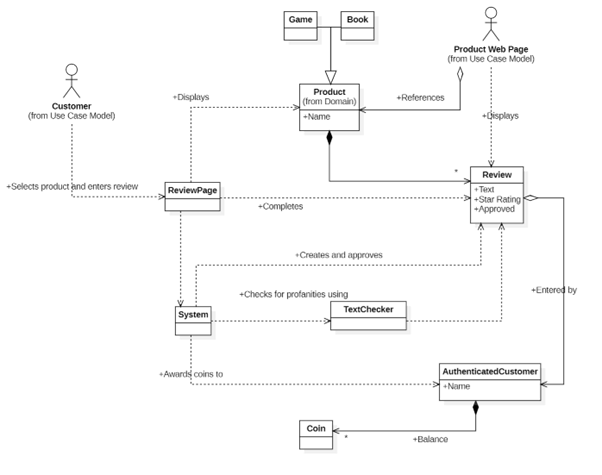
The Class Diagram shows all the classes in the system and how they connect together.
You should see that the class and attribute names are consistent with the use case text, as is the text on the lines connecting the classes.
Now, if you look at the diagram, there are obviously a few extra objects that we’ve put in; these include
- The web page where the customer will actually go to enter the data.
- We’ve added a little stick man to represent the Customer, i.e. the actual person using the system and clicking buttons on the screen. We add this to the diagram to show which classes they actually interact with.
- We’ve created a class called Authenticated Customer.
- This isn’t the person, it’s an actual class where we can store data associated with the customer, for example, the number of coins they have earned. Therefore, we need another object for them.
- Note, however, that the customer actor doesn’t have a relationship with this new class as they don’t actually use it at any point.
The classes in our diagram could actually turn out to be several things when we come to write the code:
- Traditional Java or C++ style classes
- They could be groups of functionality, for example, an API or a file containing JavaScript functions that are grouped together due to their similarity
- They could turn into a database table
- They could be an off-the-shelf piece of software that we want to incorporate into our overall system
At this point, it doesn’t really matter; we can make sensible decisions later on, but for now, we want to understand what components of the system are needed to make the whole thing work.
🌶️HOT TIP: If we have screwed up the use case text and have different nouns all referring to the same thing, we can end up with multiple classes representing that same thing. This will then flow into the code, giving us lots more to code and test, and almost certainly introduce bugs into the system. Spend time on the use case text, and the software will flow from that. If you’ve made mistakes, go back and correct them. If you need to speak to the customer to clarify something, then pick up the phone. Better to get it right now than deliver poor software later.
2b The Sequence Diagram
From the class diagram above, we have a good idea of how the classes connect together, but what we want to see now is the flow of data and events between them. I’m using a UML sequence diagram for this, but other types of flow diagrams work just as well.
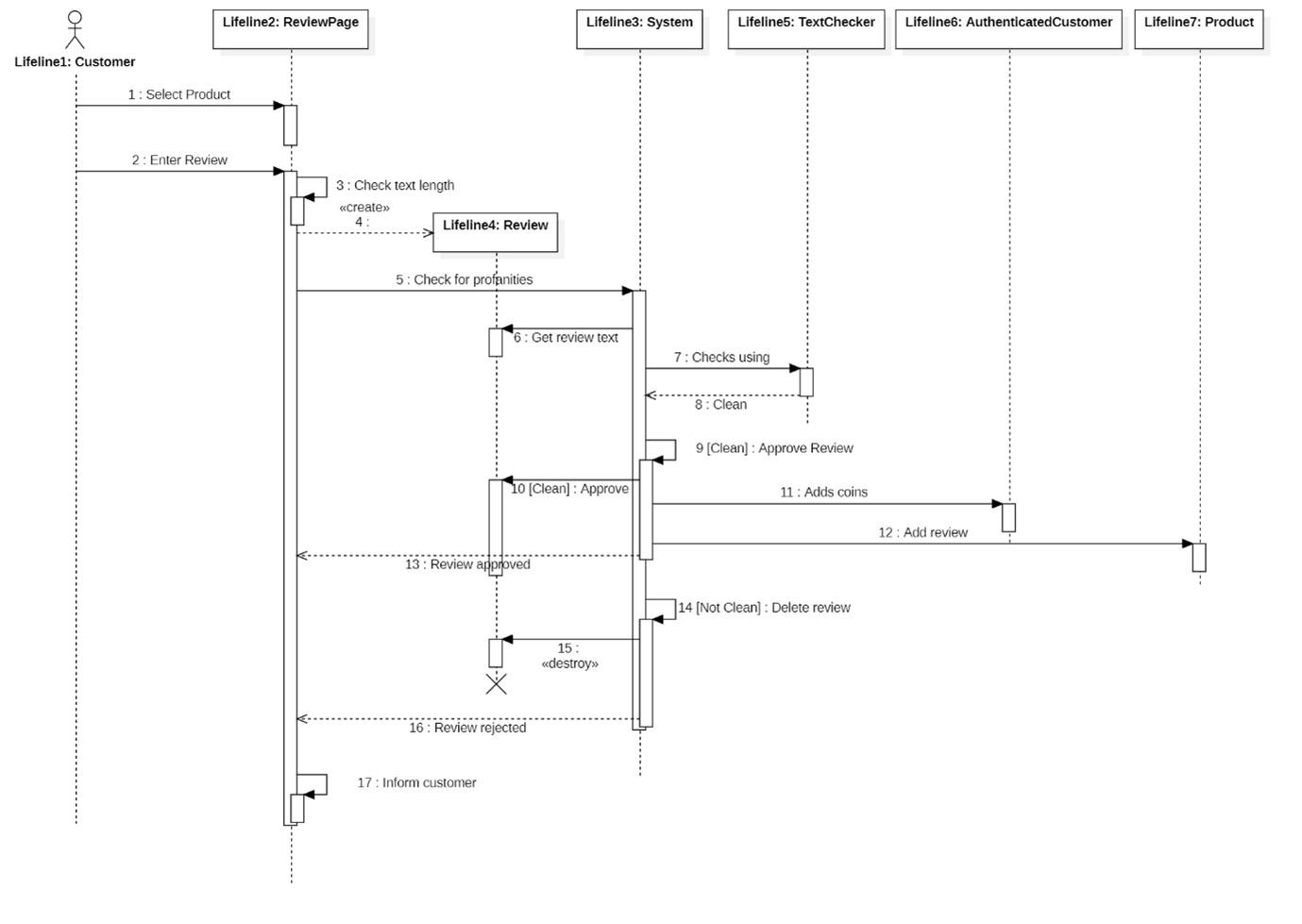
The Sequence Diagram shows the flow of events through the system.
In this sort of diagram, each line represents a function or API call from one part of the system to another. In each of these calls, data flows from one side to another, represented by the direction of the arrow. The first call is at the top of the diagram, with the control flow moving downwards.
Let’s consider line number 5, which goes from the Review Page to the System and is called Check for Profanities. This is basically a function or an API that we have to write. What does it do? Well, it’s pretty simple to tell from the diagram. First, it gets the review text, then it passes that text to the Text Checker which returns a flag to say if the text is clean or not. If clean, it then approves the review, adds coins to the authenticated customer and finally, adds the review to the product.
Laid out in this fashion, it makes it really easy to see how the code will be broken down and how we need to write each individual function.
Let’s take a quick step back. What we’ve just done in about 20 minutes of work is to produce a system design. We now know what classes we have to write, what functions they will have, and what data will be held and where!!!!!
Hey Mr software developer, if I turned around and said to you: How long is it going to take you to write that CheckForProfanities function? Do you think you could give me an accurate estimate of how long it will take to code it? You bet your bottom dollar you could, and it’s not going to be long as with enough espressos I can churn out code faster than the Flash.
🌶️HOT TIP: We’ll come back to this later when we get to actually writing the code, but the mistake here is to go back to your AI assistant and ask it to write these functions for you. The reason is that you now need to ‘engineer’ a prompt that will do exactly what you’ve come up with in the diagram. You will find that it's quicker to write the code than it is to write the prompt. Besides, if you’re using a tool like Microsoft Visual Studio or Visual Studio Code, then you just need to start typing, and the AI AutoComplete will do most of the work for you, and, if you ask it nicely, it will generate some nice unit tests at the same time.

Having forgotten to do any design work, the contractors decide to wing it, as sure we all know what we’re doing and it’ll all turn out right in the end.
There is no doubt that what we’ve put together here is an extremely simple example, and later on in this blog series, I’ll look in detail at a more complex piece of code. I hope that at least you’ve got the idea of the benefits of doing the software design. Here they are anyway:
- It provides a visual representation of the system
- Maintains consistency with original requirements enshrined in the use case text
- Reduces duplication and clarifies responsibilities
- Highlights integration points early (APIs, databases, UI)
- Speeds up onboarding for new developers
- Enables more accurate development estimates
And moreover, it's quick and easy to do compared to rewriting code later on release day!
🤖How can AI make this stuff better?
The final thing in this article, before I sign off, is that I haven’t used a lot of AI in the creation of the diagrams. Yes, there are AI tools that will happily generate these design diagrams for you. However, one of the points of the design is for you to recheck the higher-level requirements and get a clear understanding of what you’ll do to write the code. The whole design process doesn’t take very long, and if you just get an AI to churn the whole lot out, you are likely to spend far longer actually trying to understand what it’s done.
TUNE IN NEXT TIME
If you’re new to software design, then I hope you’ve started to grasp that with only a small amount of effort, you can shed an incredible amount of light on what software needs to be written and make the coding job a whole lot easier.
However, with a bit of extra tweaking, we can wring a ton more value out of the design, including security, performance, green design and most especially maintainable code architecture. At the risk of getting too technical, I’m now going to move away from design and dive a bit deeper into the test plan and show how with a bit of thinking, you can make testing a whole pile easier and quicker than many people think.
So, once again, it’s Sayonara, dudes! Why not sharpen up your pencil and take a go at a few design diagrams and see what you can accomplish? In the meantime, please share our LinkedIn page and help your coworkers out there.
🧃Juicy Download
In the meantime, I’ve summarized the main points from this article in this handy download. Enter your name and email address and a nice PDF will wing its way directly to your inbox.
We'll also notify you when future editions are released and send their notes without having to sign up again (and you can unsubscribe at any time).
Thank you for subscribing!
Have a great day!
