Project Planning, Inception, Sprint 0, or Not Stuffing Things Up Right From the Start
The Secret Sauce to Agile Development Part 5
30 years of experience getting it right distilled into my new blog!
Hello and welcome back to this fifth instalment in my groundbreaking and earth-shattering incredi-blog on Agile Software Development. Before going any further, let me say straight up that this issue is dedicated to one of my all-time favourite superheroes, Homer Simpson!

A massive thanks to Simpsons Crazy for spicing up today's blog with a load of amazing hand-drawn Homer pics!
No, you’re definitely in the right place; this is indeed a blog about agile software development. The reason I’ve dedicated this to Homer is that I love that Doh! moment when our hero realizes he has royally stuffed up, and it’s at this very point in the project lifecycle that many software teams start stuffing things up royally too.
Recap, where on earth are we?
At the end of the last article, we are doing pretty well. We’ve understood the stakeholders, their goals and value measurements, we’ve written down the list of requirements, including both user stories and use cases, and we’ve even come up with a potential solution and knocked up a bit of code with the help of CoPilot. I mean, we’re practically finished, right?
Just back away from the compiler for five minutes, Tiger! I’ll bet you a tenner that if you start coding now, then you’ll have to bin it and start over, which, let’s be honest, is going to delay the project.
A lot of agile approaches have what’s called a Sprint Zero or a setup phase, or maybe it's Inception or just good old-fashioned Project Planning. Whatever you choose to call it, the point of this phase is to ask and find answers to some big questions about the project and to prepare for the actual implementation to start.
If you’re working in a consultancy or delivering solutions to the client, then almost certainly your customer will bring along technical people to check everything that you’re going to tell them. We’ve therefore got to make it sound like we know what we’re doing because although we’ll be charging them for our efforts planning the project, we’re going to be asking them to part with a lot more cash for the actual development.

With his plan in place, our boy looks real professional in front of the client’s sales team.
Today I’m going to tell you about a whole pile of fun areas that many teams and developers don’t know or don’t care about, which, funnily enough, cause them to stuff royally up. This fact normally becomes painfully apparent just before the first production release when the software isn’t ready and the team end up pulling a ton of late nights and extra shifts. Nothing is going to please the development team more than being asked to stay late on Friday night and miss out on drinking pints down the pub!
A lot of these questions I’m going to pose have really straightforward answers, and many companies will build up standard ways of working or off-the-shelf solutions that make this easy. However, they all need to be answered and agreed with both the delivery team and the customer before we start work, or, as in the old Irving Berlin class, “there may be trouble ahead.”
The questions are divided into four key areas. These are Project Management, Design & Implementation, Testing, and IT and Operations.

DOH - Asked to work overtime, our hero is late for his usual Friday night drink up with the lads.
Section 1 - Project Management, it’s not just for managers!
This is the one that everyone loves to forget, and it's probably got the most gotchas!
In this section, we are interested in how the project will be managed. This includes how we report progress and results back to the client. For example, will there be an end-of-sprint meeting where we showcase the released software? Do we have a chart or dashboard highlighting the value measurements which is updated live and visible to all stakeholders?
The client will be particularly interested in when they are expected to pay, and they’ll want to know that we have adequately budgeted for the project and that there aren’t going to be any hidden costs coming up. From our side, we’ll need to have a clear understanding of what staff will be involved in the delivery, how much of their time we’ll need and therefore how much that’s all going to cost.
Also, where are the artefacts, like the code and tests that the team will produce, actually going to be stored? How will the releases be provided, and how are we going to version the software when it goes out, so bugs can be reported against it? And BTW, how are we going to actually report bugs? Will the users fill out the back of fag packet or will they have a cool system like Jira to log their bugs in, (which BTW could be costing us money up front).
In today’s modern world, information security is extremely important. With all the information listed above floating around the project, (and of course there are going to be things like access control and passwords as we start spinning up servers or loading documents in our Teams site), we need to know who will have access to what information and give confidence that we’re not going to get a call from the GDPR police any time soon. Note that this is about the information in the project and not the control of the information in the end solution. We’ll come to that when we talk about design and testing.

Faced with a bunch of easy questions, our project manager confidently rhymes off the company standard answers while barely missing a beat!
I’ve not even got into the joys of risk, issues assumptions and dependencies yet, but one important question, which may seem really stupid is that we need to ask how the project is going to be run, what agile process like SCRUM or Kanban are we going to use, what’s the sprint length, who are we actually delivering the results to and how often?
Hold on, back up there a minute, agile process, what sort of weed are you puffing, grandad, does it actually really matter? Sounds like you’re just trying to make trouble.
🧻INANE RAMBLING, SCRUM to a Crawl
Well, Jimmy, I got to work with a company that brought me in to quality check one of their biggest software development projects. It was a bank, and the software was to monitor and charge for financial transactions, so we’re talking big sums of cash involved, and they wanted to make sure the team got it right.
The first step was to review the project manager’s plan for the delivery. I asked him what agile process the team were planning to use and got the standard response of Dur… It’s going to be SCRUM, of course, with a two-week sprint cycle.
Oh wow, those requirements are pretty complicated and you’ll be working with a lot of third-party technologies that your team have never used before. Are you confident that you’ll be able to design, develop, test and release that first requirement in exactly two weeks today?
I mean, it’s a valid question because after all, that’s what agile is about, quickly releasing small increments of high-value software, right, (if we truck right over to the good old agile manifesto, we can see that’s principal number 1, right at the top: Principles behind the Agile Manifesto)
‘Oh no, ’ he said, ‘what a stupid idea, we’re not going to be doing that. Sprint one, we’re going to write the code, sprint two, we’ll test it, sprint three, we’ll release it and then sprint four, we’ll fix any bugs that the customers find.
Ha ha ha ha ha! So, 8 weeks before we see anything useful, sounds very much like an old-fashioned sort of waterfall process to me, or if you really want to push the boundaries of agile, then it’s a SCRUM with an 8-week sprint cycle or maybe we should call it an 8-week crawl cycle.
Let’s hope that the client, who knows all about agile, isn’t actually expecting any sort of working release any time soon, or they’re going to be very disappointed.
Is it another Homer moment? Yes, I think it is - DOH!

DOH!
Ok, take a deep breath, yes, there was a lot in that, but when you look back, many of the answers are fairly straightforward and putting stuff in place now is going to save a lot of time and trouble later on. Let’s move on to the second section, which is Design & Implementation —aka the part where we pretend we know what we’re doing.
Section 2 - Design & Implementation, the lost arts of software development!
In this section, we need to deconstruct our requirements and dig into the structure of the software. There seems to be a belief amongst many agile practitioners that if we make our increments small enough, then somehow, extensible, reusable, performant software architecture will somehow materialize magically out of the ether. Anyone who tells you this is drinking way too much espresso.
Simply handing the developers the user stories and telling them to get cracking with the compiler is not going to produce good quality, and most importantly, reusable and maintainable software anywhere near the end of the sprint.
Why do we need reusable, maintainable software? Well, if you do a bad job writing the code, then when you start making changes, it's going to become more and more unmanageable. Bad code typically has many inter-dependencies, and when you make a change to one place, the likelihood is that you’ll introduce a bug somewhere else. And, guess what, agile software development is about making lots and lots of small changes quickly! That means that if you don’t have a reusable software architecture, you’ll be taking the express road to code spagettification and technical debt hell.
Instead, if we’ve done a good job speccing out our requirements, we will quickly be able to tease out the software architecture and present our developers with a visual representation of the code they need to write, with all the big questions answered and risks dealt with.

Making changes to our badly designed, unstable code base one day before the release makes the man who built his house upon the sand look a whole lot less foolish.
In this section of the planning phase, we need to decide how we will do the design. We’ll look at design in another blog, but at a minimum, you should be producing diagrams that show things like: the classes or objects that need to be coded, the flows of programme execution through the system, the deployable components and the infrastructure they will run on. There are many great approaches out there and modern AI tools that make all this stuff extremely easy. I like to use UML, but you could be doing C4 or even just knocking up diagrams in Visio or PowerPoint.
Alongside the design itself, we need to track major design decisions so that everyone else in the team is aware of them, new people coming in are quickly and easily able to onboard, and if we have to hand the completed project over to the customer at the end, then they can easily get up and running.
A simple example of this is dependent libraries. Instead of building the code yourself, you may know of an open-source library that’s got a lot of the functionality that you need. Brilliant, let’s bring down the NuGet package inside Visual Studio and job done!
Only problem is that there are about a million versions and massive potential differences between each of them. So, let’s just write down what the library is, why we’ve used it and what build we’re taking. Let’s put that in a spreadsheet or OneNote somewhere for everyone to see and make sure they are using the same version. Nice and easy!
Also in this section are licenses, and in particular the question ‘What license do we distribute our software under?’ If you’ve been pretty cavalier with your software design and pulled in a ton of free open source libraries from t’internet you may find that you're forced to distribute your code into the public domain! I’m going to take a wild stab in the dark here, but I’m pretty sure that your customer isn’t going to want the expensive code what they have just paid you for uploaded into git hub for the world to nick.
It is indeed another Homer moment – DOH!

After failing to read the license conditions, Peggy is forced to upload all the customers’ expensive code to the internet for their biggest competitors to nick for free! It’s time to bring in Alan Sugar.
🌍REAL WORLD EXAMPLE, I love it when a plan comes together!
If you remember, we’re putting together an online coin shop for Mr Charlie Bluster, where customers can earn virtual money by purchasing products and leaving reviews and then spend it on Charlie’s digital downloads:
Here are some of the choices we’ve made to manage our project:
- Project Management Methodology: We’re going to run this using Kanban, no fixed sprint length, and the plan is to release the stories to the client as soon as they are ready. This, for me, is the fastest and most agile approach as it should be the minimum amount of time from start to release, minimising expensive sprint planning meetings.
- Reporting: We will create a report in Microsoft Power BI that will be updated live with data from our ADO system. The report will show the value delivered to the client against the number of hours required to develop the software (rolled up from the hours logged against each task).
- Meetings: Daily stand-up meetings for our delivery team will keep everyone aligned, and we’ll agree on weekly meetings with the client at which we will talk about the value measurements and get feedback on any released software. A retrospective meeting will be held after each Programme Increment to allow us to continually improve our delivery.
- Risks: The customer has specifically asked that we track all our risks, assumptions and dependencies in their own spreadsheet created using Microsoft Excel. This will be held on the client’s OneDrive, for which our project manager will have access. This is a dead common scenario in software projects where there is certain information that the customers understand and like to see. Perhaps this is for their own calculations or to provide confidence that we know what we are doing.
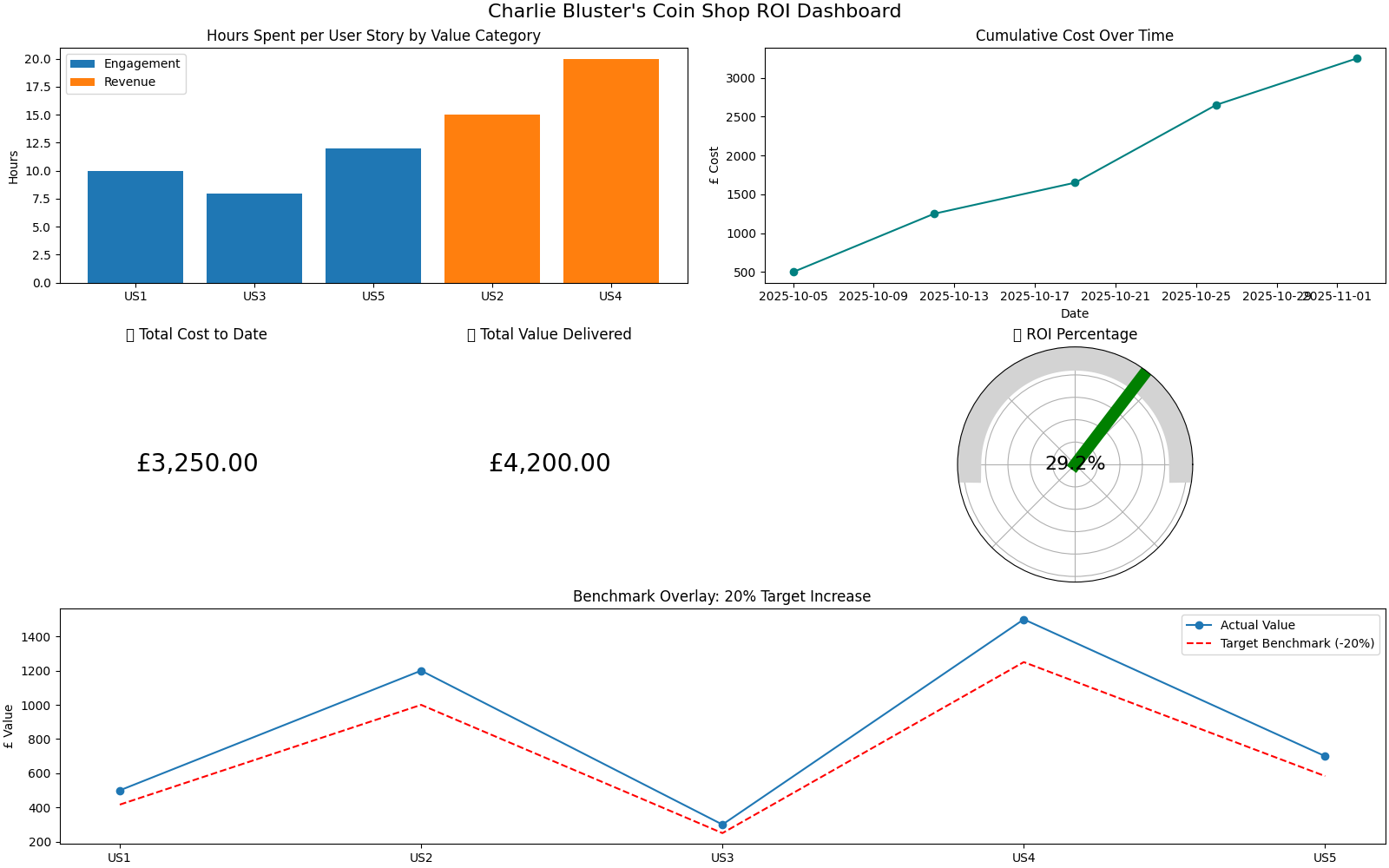
With Microsoft Power BI, we can easily configure some nice reports showing exactly those value measurements the client has asked for.
I’ve used Copilot to generate this sample Power BI report. Copilot has also handily provided instructions to connect our ADO to Power BI and bring in additional data, such as staff costs from a supporting Excel spreadsheet. The report includes:
- A bar chart showing hours spent per user story by value category
- A line chart tracking cumulative cost over time
- KPI cards for total cost and value delivered
- A gauge chart for ROI percentage
- A benchmark overlay comparing actual value against the 20% target
Seeing magic numbers like the Return on Investment (assuming that the graphs are going in the right direction) makes it easy for the client to decide to keep funding our software project.
Anyway, continuing on with some of the choices for our live project:
- Configuration Management: We’ll use the Git source control approach with all of the code and assets sourced using Microsoft Azure DevOps (which is free for small teams). With this approach, we will be able to recover the exact versions of released code, which will help track down any bugs reported.
- Version Control: The software will be versioned with a three-figure version number in the Microsoft format. The version number will be clearly displayed at the bottom of each screen. We’ll increment the version number with each release and label the source accordingly. This will allow us to extract the specific version of code for any release.
- Bug Reporting: Any bugs will be added to the project backlog, however, we can’t give access to the ADO system to end customers due to the cost and admin effort involved. Therefore, we’ll create a separate Microsoft Form which can be used to report bugs. This will have a field for the customer to report the version number of the software that contains the bug.
- Information security, access to all the assets will be strictly limited to the development team. We can apply security through Microsoft ADO to ensure that only the right people get access to the right assets.
With this sort of system in place, it will make it really easy for us to control the different versions of our software, to quickly and effectively reproduce and solve bugs and appear professional in front of the customer.
🤖Where does AI make this stuff better? Well, bad news, Jimmy, AI isn’t going to manage the project for you. Unfortunately, you need to do that yourself, and it's important that you do so because it's you and not Chat GPT who will have to go in front of the customer and tell them how things are going. At the end of the day, the client is paying you to solve their business problem (through software); they aren’t paying for you to write lines of code specifically.
That being said, the AI can be very useful at coming back with information to help get this stuff right. For example, we all know that the code needs to be backed up in source control; however, the whole world of Git may be a complete mystery to you or your team. No worries, with a quick prompt, we can find out all we need to know, including what commands we should use and how to integrate it with our IDE.
Or perhaps you’re new to risk management and not sure what information you should be tracking? Why not just pull up Excel, and ask Copilot to create a RAID sheet with a few sample entries for you:
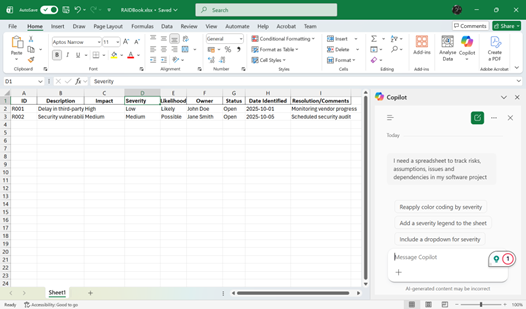
Don’t have a load of corporate templates or nice tools to manage this stuff, no worries, Copilot will create them all for you in a jiffy!
A word of warning, Copilot and other AI tools are not yet at the point where they will maintain these assets for you live, you’ve got to do that yourself. Stuff is advancing so fast that I’m sure by the time this blog actually gets released, that functionality will have been added.
Jimmy: hold on a wee minute, why on earth are you rattling on about all this rubbish?? Surely we’re just trying to knock out a few lines of code! You’re just trying to complicate everything with risks and dependencies. Wise up, you old fool, and move out of the way!
Let’s just suppose for a minute that before we can deliver our code, another team or supplier needs to hand over a library? Not so far-fetched, huh? Pretty common scenario? Well, what happens if that library is late, or it doesn’t quite do what you expect it to do, and as a result, you’re not going to be able to deliver on time? Whose fault is that going to be?
Rather, a slightly more important question is, who is your customer going to blame? Are they going to be happy with you whining on, complaining about some other team that didn’t do their jobs? No, they’re not going to care, and they are also not going to pay you either.
What they’ll say is: Who cares about your stupid problems? At the end of the day, you’ve not given us what we ask for, so we’re certainly not going to pay you. Now, get back in there and get that code working pronto!!
Oh dear, and to be honest, I’m sure that many of our beloved readers have been in just this very situation. That’s why it's important for us to point out to our client as early as possible that we’ll be dependent on someone else, and if they’re delayed, so will we be. Having this written down in our risk sheet and discussed with our customer’s representative at our weekly meeting is therefore going to be extremely important!
Having forgot to tell the customer about any of the problems, the Scrum Master leaves a helpful reminder on the team’s Kanban board.
🍟TAKEAWAY TODAY
So, great, we’ve thought hard and put together some sensible answers that we can replay to the customer so they know what to expect when we start the development. Presenting back this sort of information is going to make us look more professional than James Bond (if he took up Software Development).
🌶️HOT TIP Just a wee tip, though. While in this blog, I’ve just thrown out a few bullets, it’s good to have a standard method of storing this information for each of your projects. The best approach I’ve seen is using a PowerPoint template where the team fills out the required information.
PowerPoint, are you sure? Maybe you haven’t taken your normal pills for someone of your advanced age?
Yes, actually PowerPoint, and the reason is that it helps to present this information back to the customer at the end of the planning phase and will make you slicker than the Fonz on ice!
Also, you may notice that we’ve acquired a few extra tasks, for example, we’ve agreed to create a Microsoft Form to record bugs, we need to bring up our ADO system with a source control repository, we’ve got to make a Risk tracking spreadsheet. Many of these tasks are really easy (especially with our favourite AI assistant), but some may be bigger or even impact the construction of the software. For these, make sure you record a task on the project backlog so it's not forgotten.
TUNE IN NEXT TIME
I hope that today has raised a few important questions about software development projects that maybe you weren’t aware of before. Stuff that is actually pretty straightforward, but can very quickly and easily bite you in the UAT if you don’t have an answer in advance.
The versioning one is a classical example, Jimmy gets his code out the door, the client finds a bug as part of the User Acceptance Testing process and asks how they should report it. Uh oh, there’s not even a version number displayed anywhere in the application, and the next thing is the team is back in on another late-nighter with Acceptance Testing pushed out a couple of days.
Looking smooth for the client there, Jimmy, or perhaps not.
If I’ve not upset the apple cart enough, the next article is going to continue the joys of project planning by looking at two more areas of special importance. These are Testing and IT / Operations.
But sure, testing is out-moded, old man, surely Claude (the AI), will just generate all the tests for us?
Is this true? Do we still need to tell the AI what tests we want, what about non-functional tests like security, and will the customer be happy knowing that our digital buddy has got it all in hand, or are they going to want some good old-fashioned manual results to build confidence that the software is actually going to work when they give it to their own clients?
Find out all about it in the next blog: Project Management 2 – Judgement Day!
I’m afraid that’s it for blog 5. Sayonara dudes, stay safe, and please, please share our LinkedIn page and help your co-workers avoid a few of those deadly Homer moments in their own projects.

And it's goodnight from me, and goodnight from him also!
🧃Juicy Download
In the meantime, I’ve summarized the main points from this article in this handy download. Enter your name and email address and a nice PDF will wing its way directly to your inbox.
We'll also notify you when future editions are released and send their notes without having to sign up again, (and you can unsubscribe at any time).
Thank you for subscribing!
Have a great day!

Additional Image Credits
- Home Simpson images courtesy of Simpsons Crazy