Project Planning 2, Judgement Day!
The Secret Sauce to Agile Development Part 6
30 years of experience getting it right distilled into my new blog!
Nanu-nanu and huzzah for this, the sixth blog in my Secret Sauce Series, spilling the secrets of agile software development and making it easy for everyone whilst trying to subtly inject as many quotes from everyone's favourite Arnie film franchise as possible.
For those of you who read blog number 5, you may remember our special guest referee, Homer Simpson, who we brought in to highlight those little gotchas in project planning that can really stuff your project royally over. Well, today, we’re going to continue our little mini-series on Project Planning, but hopefully, by the time we get to the end, we’ll swap Homer for Hannibal Smith, who, as we all know, is an expert planner.

Having wisely sorted out his software project plan in advance, Santa lights up, loving it when a plan comes together.
Section 3, Testing, Machines Need Love Too!
In this section, I’m going to talk about that wonderful topic that so many software developers really, really hate. Testing! In fact, it’s nearly as bad as mentioning the other despicable word, Commenting!
Why or why, since we have working software right here (what we have downloaded fresh from the internet or indeed that CoPilot has kindly just vomited into our IDE), do we need to waste any time testing it? Don’t you trust the internet grandad???
🧻INANE RAMBLING, You’re Terminated!
We had a really good learning experience in one of my previous clients, where one of their crack software development teams uploaded debug code into their customers’ production web server. This software was so awesome that it actually contained plain-text passwords stored in configuration files that could be opened directly from the browser. It was a work of beauty, and it took the hackers about 10 milliseconds after the software was uploaded to sniff the passwords, bring down the servers and steal a ton of end customer personal info out of the database. The client, BTW, was one of the world’s biggest and best-known automotive companies, so it wasn’t like they had too much data to nick or anything.
Brilliant!
So the company CEO called a big meeting to kick ass and lay blame for the shoddy workmanship and the finger gets pointed at the project manager in charge of the software project. Well, yes he said we do have quality procedures but we certainly don’t have time to follow any of those, after all the customer has chosen SCRUM with a one-week sprint cycle and that leaves us no time to do anything. Besides, none of the requirements stated that they actually wanted security testing???

It took our humble Vaudevillian Veteran Verily V Seconds to Vanquish the Customer’s non-existing security protection, Veneer of Vanity or no!
DOH, once again (for those of you who read the last blog), we should have brought Homer in to manage the project, who would surely have done a better job. This, believe it or not, is a real scenario that happened not too long ago.
The customer might not have asked for security testing, but they expected to get working software, and it's up to us to prove to the client that we’ve properly tested it.
That’s why having a test plan is vitally important. In this very plan, we need to decide what types of test we’re going to do.
Eh?
Well, we can't just rely on functional testing, i.e. making sure it works the way the client has asked for it to work, but we also have to include non-functional testing for things like security, performance, accessibility and others. Aside from the code, we’ll also be testing the environments that the software will be deployed to, which, let’s be honest, could be anything from servers to laptops, to mobile phones or even watches or other wearable technology.
If you’re new to testing and not sure what types of test you should be thinking about, there is a really great picture from ISO.
You what???
If you’ve not come across ISO before, they are a big organization that publishes standards on particular areas, especially software development. They’ve got standards for just about everything, design, testing, making tea, you name it.
Here is ISO 25010, one of my favourites, on software product quality (which pretty much means testing).
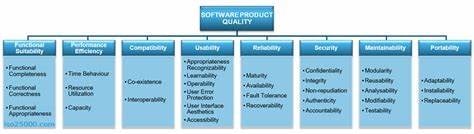
My Mission is to Protect You. The ISO Standard covers every type of test imaginable!
There are 8 areas, each representing a different type of test that you can do. Now, it might not be appropriate for your team to run all of these tests, but at least we should consider each one and whether or not it should be included.
Here’s a quick rundown:
- Functional Suitability – does it work logically the way it's supposed to? This comes back to the use case text or the how.
- Performance Efficiency – does it respond fast enough, especially if we start adding loads of data or loads of users?
- Compatibility – testing how it interacts with other systems, or if we need to have multiple instances all running at the same time.
- Usability – this can include stuff like accessibility and making the software viable for users with visual or manual impairments.
- Reliability – what happens when it falls over or a connection is lost, do we need to test for that?
- Security – so important these days, regardless of whether the customer actually asked for security testing or not.
- Maintainability – for me, this boils down to analysing the code to see how easy it is to maintain and extend.
- Portability - does it need to work across different browsers, mobile devices or types of operating systems?
Within our test plan, we need to outline what areas of testing we need to include and what types of test we are going to run and on what devices, environments and software configurations. We’ll actually create the tests in-sprint along with, or in some cases, before the code. We can use both manual testing and automated testing, normally employing one or more tools.
Before we move on from testing, I also want to mention that there may be standards to test against that our customers will be particularly concerned about. For example, they could have told all their own clients that their website is WCAG compliant, which is the international standard for accessibility testing. This would mean that any code you write will have to be WCAG compliant and, guess what, you are going to have to run some accessibility testing.
You might have noticed that this stuff might affect the number of tasks you have to do when the sprint starts, so it’s good to have it all noted down in your test plan.
That brings us nicely into the fourth area of project planning:
Section 4, IT & Ops: Same Make, Same Model, New Mission.
I’ve called it IT & Operations, but to be fair, this section is really about tools, technologies and platforms. It's also about how we release the software and what information we need to provide our own or even our end customer operations teams along with it.
I’ve seen loads of projects fail because the PM hasn’t bothered to take the potentially huge cost of the technologies we need into account when thinking about the budget. Let’s say, for example, that your team is building a .Net application and you’re going to be using Microsoft Visual Studio with Azure DevOps, (a great choice BTW), then unless you’re a small team, you’re going to have to fork out for licenses.
Huge Cost, surely not, I mean, we’re going to download Visual Studio Community Edition, which is, of course, free. Once again, old man, you’re over-complicating things.
Can we just use the free community edition? Actually, no, because you can’t use those for commercial purposes, and you could end up slapped with a massive fine!
DOH! Our old friend, Homer, strikes again!
In our real world example where there is limited budget, the cost of development IDEs could have an significant impact on the project, however for most teams, where there are large amounts of dosh being chucked around, these expenses are low and in fact, its typically a smart decision to pay out for a high quality IDE instead of spending lots of costly development time setting up below-par dev environments and projects.
Never mind the price of the development IDE, wait until you see the prices of security testing tools, which in today's modern world of interconnected code running in the cloud are more and more essential. And we’ve not even talked about performance load testing, or maybe a mobile app device cloud!

Faced with unforeseen mounting costs, Sandra is forced to dip into the team's beer fund to keep the project afloat.
I’m hoping you get the picture. We need to take some time out right at the start of the project to figure out what tools we’re going to use, how much they’re going to cost and to feed that information back into the budget that we talked about in the Project Planning section of the last blog. It may be that the customer needs to put the brakes on and ramp back on their requirements a bit if they’re going to be footing too high a bill.
Next to tools in terms of cost are environments. Basic cloud servers and relational database instances aren’t too dear, but if we start talking about redundancies, failover and uptime with lots of nines in it, we could be spending a ton more pennies.
If we’re developing a mobile app, there’s going to be extra costs as we’ll need to test across lots of different devices in the aforementioned device cloud, and we may even need some sort of crowd to help with exploratory testing.
Let’s also talk about the actual release of the software. If you’re handing over a webserver to the client or even to your own ops team, they will need to know how to look after it. What files are going to be installed, what infrastructure is required or potentially, what are the passwords for those servers you are providing with it? How is the admin portal accessed, how can we change the configuration or get logs out to diagnose problems when something goes wrong. Are there particular versions of the operating systems or cloud servers that it needs to be installed on?
In some cases, teams will provide a list of documented instructions or maybe even run an in-house training course to make sure these guys are up to speed.
It also might be that you are building something like a desktop application. This can be worse as you have to give thought to how it's going to be installed, (for example, do you have to build an installer), and what instructions you’ll need to provide the end user. If there is a user interface, did you think about building some sort of help file or chatbot to provide assistance to the users when something goes wrong?
And let’s not even get started on the subject of warranty and how that’s going to work, and how many bugs you’ll need to fix for free and what the turnaround time on those is going to be!
🌍REAL WORLD EXAMPLE, Coin Shop Chaos, It’s Nothing Personal!
One thing I learned from my time at the company Expleo (one of the world’s foremost testing companies) is that testing can be complicated and expensive and potentially cost way more than the actual development of the code, and that’s even with lots of shiny AI-enabled testing tools.
Remember that the main constraint on Charlie’s project is the massive lack of budget. We need to keep the overall costs down as much as possible, and as such, will need to shy away from expensive dynamic testing tools and rely more on code reviews, especially for areas like security and performance.
Let’s make some choices for some of the different testing areas now:
Functional suitability: this is the big one, and it’s also fortunately the easiest. We can cover the vast majority of the functionality in our application through coded unit tests. These bad boys are quick and easy to write (especially when you ask Claude, our AI assistant-slash-test-writing cyborg, to help write them for you), and can also be executed very quickly as part of the build pipeline. If we’re clever with our software architecture, we can easily obtain a test coverage in the high nineties, which means that very little of the code will remain that hasn’t been functionally tested.
🤖Where can AI make this stuff better?
Normally, to run tests, you need some type of test framework and a runner to execute them and return the results. For example, if you’re building code in Microsoft Visual Studio, there is a really lovely side panel that will list all of your tests, allow you to run them and then show the results. You can even run or debug tests individually if you need to narrow down a problem. Azure DevOps also has a nice facility to run tests as part of the build and send you back the results.
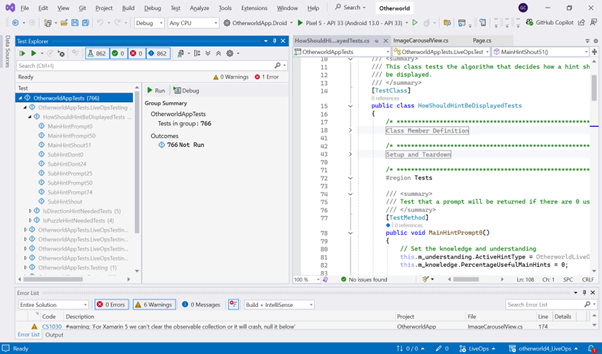
It feels no pity, no fear, no pain, it just runs tests. Visual Studio whoops butt when it comes to running, managing and debugging tests.
What happens, though, if you have JavaScript embedded within an HTML page, like what we have here? Things can start to become a little trickier, and you typically need some sort of framework or library to help out.
Or do you? I asked Claude to generate a few tests for my front-end JavaScript, and it not only generated the tests, it slammed out the runner and a whole UI to display the results with some nice buttons to kick things off!!! Absolutely fabulous, at least for me anyway. I certainly wouldn’t want to work for a company that creates test frameworks though!
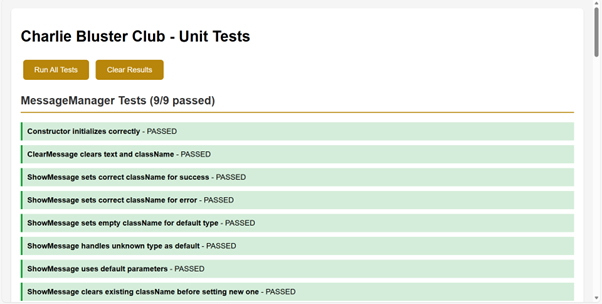
Once he was programmed to destroy the future, now his mission is to protect it. Claude generates the tests, the framework, the runner and everything else that you need while barely pausing for breath.
So here are our choices for Charlie’s Coin Shop with respect to functional testing:
- The entire back end can be covered by Unit tests for which we’ll use the Vitest framework.
- For the front end, we’ll create unit tests for all the JavaScript code using Vitest with the runner being generated by the AI, Claude.
- These tests will be run on every single build.
- One hour of manual exploratory testing will be done before every major release.
- We’ll run manual tests on the browsers, Edge, Chrome and Safari with tests on both Windows desktop, iPhone and Android mobile, (our test plan should really include the specific versions of these together with the exact device types if we were being picky).
Usability:
One of the most important components here is Accessibility. By accessibility, we mean making sure that the software can be used by people less able. For example, this might mean we need to add ALT tags to all the images so that someone using a screen reader—whether due to visual impairment or reading difficulty—can understand the picture if they can’t see it properly. Likewise, all our buttons and menu options should have keyboard shortcuts to help people who struggle to use the mouse, and we shouldn’t employ palettes in the user interface that will make things difficult for those with colour blindness.
Our customer, Charlie Bluster, has already said we need to test against the Web Content Accessibility Guidelines Standard (or WCAG as it’s widely known). This will definitely need to be recorded in our test plan, and we’ll need to provide results to prove that we’ve done it.
In the past, accessibility testing was very difficult due to the small number of good tools available, and it normally required a large manual effort to go through and check everything.
🤖Here’s where AI comes to the rescue once again – we can have the AI review the code of the entire front end and produce a WCAG-compliant report. It's also a good idea to run a manual exploratory test pass on, say, one browser, before we release, to verify that the stuff does actually work. Once again, Claude will kindly generate us a manual test plan for this job.
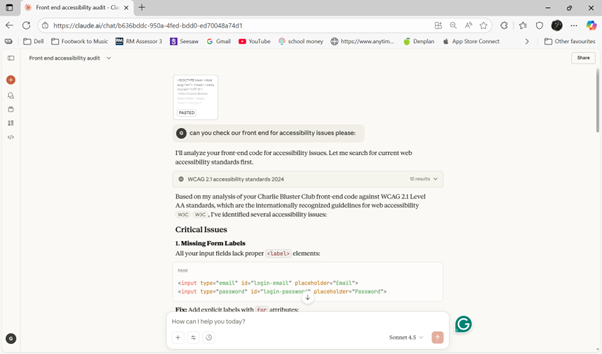
Sucking diesel, Claude quickly scans our HTML for accessibility problems. Oh no, it's found tons of minor issues, but that’s ok because it’s also fixed them all in the same breath!
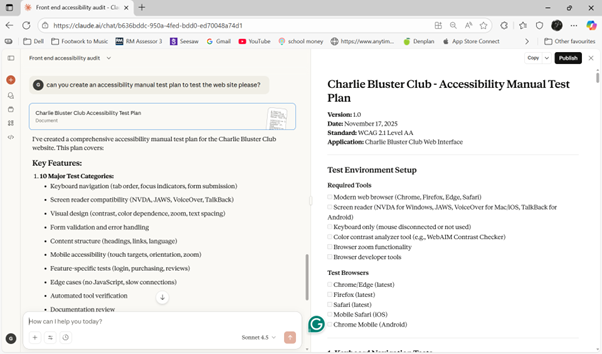
A second prompt is required for Claude to spit out the manual test plan. What would have needed a couple of days of graft last year is covered in about 30 seconds of hard prompting today.
That’s great, so for Charlie’s Coin Shop, when it comes to accessibility, we will execute the manual test plan before each release, as well as scanning the code with the AI and include the report within our results.
We’re going to be diving into the test plan in a future blog, so for now, I’m going to leave it at these two ISO 25010 areas.
I hope that you can see why it’s so important that we take time out in advance to think how we are going to test.
If you don’t, then, just like my Inane Rambling story, you suddenly find out at the last minute that you need to do some emergency testing, you’ve not got a tool, and then you’re paying through the nose to get one, or worse, you’ve got to hire in some expensive consultancy to do the testing for you.
Your slim profit margin is going to get eroded very quickly, which is going to make Mr Flibble very sad indeed (and trust me, you don’t want to see him when he’s angry).
🌶️HOT TIP You need to have a plan for each of the 8 areas, even if that plan is ‘we don’t need to test that and here’s why. For each type of test, the plan should include what we’re going to do (including any standards we need to test against), what tools we’ll need, how much it will cost, who is going to do the test and how often, how long it will take to run the tests and how the results will be interpreted. It's also good to include what benchmarks we’ll use to determine if the test has passed or not. For example, we might allow minor issues to go through if they’re not likely to be found.
IT & Ops: In this section, we’re focused on the tools and technologies we’re going to use for Charlie’s Coin Shop and also what happens after the software is released.
- For our Tech Stack, we’re going to be building a web app embedded within a MailerLite Low Code website. The client side will need to be pure HTML and JavaScript, and we’ve gone with a Firebase Functions back end. Our back end will be written in Typescript, which is a better choice than JavaScript when it comes to creating re-usable code (more on this in the next blog).
- Build and Release
- An automated build pipeline that runs all the coded unit tests is a really good idea, as this will give a huge amount of confidence that everything works. This can very easily be done within Azure DevOps at minimal and potentially even zero cost (depending on the number of builds that we run).
- For release, we’ve got to deploy code into Google Firebase and also into Mailerlite. Automating MailerLite deployment is a pain, so we’ll manually copy code at release. For Firebase, a simple command-line deploy script will do nicely—just double-click when it’s go time. Not sure how to write one? Copilot’s got your back.
- Environments
- Hosting is through Firebase Functions, with the data being stored in Firebase. These are free up to 125,000 invocations per month on the Spark plan—more info here.
- Third-party APIs and Products
- We’ll have a login to the customer’s MailerLite (note that we’ll need to add this to our dependencies), so that we can release the production code.
- We’ll set up the Firebase project and provide the client access when we release the code; however, we’ll continue to look after it after go-live.
- Note that we’ll be using the Google APIs in our code, and the following version has been selected based on our initial research as the best and most stable one available.
- Maintenance and Support (also includes SLAs and Ticketing)
- As already mentioned, all bugs, including website outages, will be reported via the online Microsoft form. We’ll triage any issues that come in and classify them as high, medium, low and change requests. We’ll be liable to fix any bugs for 3 months following the release of the project, with high ones having a turnaround time of 24 hours, medium 3 days and low 5 days. Change requests will be discussed with the client at our regular catch-ups, costed and a schedule for delivery agreed.
- Disaster recovery plan
- We’re relying on Google for failover (see the following information); however, we’ll maintain a complete copy of the Firebase project that can be used in the case of corruption to the first one.
- Scheduled database backups will be taken both daily and weekly and stored within the Google environment. This is standard functionality provided by Firebase.
- Warranty and support
- We’ll fix issues for 3 months following the release of our project with our client services rep available within business hours (9 – 5 BST), to answer any questions about the software.
- Further support outside these times is available on request and will be scoped and costed separately.
- Training requirements
- Fortunately for us, our own operations engineers will be handling the administration and management of the software going forward, so there’s no need to provide detailed documentation or training guides for the client. However, we’ll still need to train our own people, so having a document that lists the various logins and a description of what is held within Google Firebase is going to be very useful. We’ll need to create a task in the Kanban board for the creation of these assets as well, and extra time will need to be factored into the sprint.

You’ve been targeted for termination! After failing to put a disaster recovery plan in place, the call centre experiences a slight increase in complaints when the web server goes down.
OK, ok, so that was a bit long-winded, but hopefully it’s woken you up to some of the real-life things that we need to consider. For example, once the project has finished, we’re going to be expected to do 3 months of support and let me tell you that there will be bugs coming up
🌶️HOT TIP 2, Bug Free Actually Means Bugs That Come At No Extra Cost, rather than software without any bugs, which is a myth potentially put out by Sauron to deceive you. Make sure that you build in time to your plan to fix these.
🍟TAKEAWAY TODAY
Over this article and the last one, we’ve had a good think about how we are going to run the project. I now recommend doing a little bit more work in sprint 0 to get us some good, hard estimations of how long it will take before we are able to give out our first release and how much this is going to cost the customer. Coming back with this information isn’t going to take too long, but it should give a very high degree of confidence that we know what we are doing and can be trusted with our clients' money.
In our Real World Examples in these 2 articles, I’ve provided some of the answers for Charlie Bluster’s Coin Shop. However, as we’ve gone through this whole project planning section, I’ve been noting down tasks that need to be done before we can release that are in addition to the normal creation of code, tests and release pipeline. These have all gone into ADO, and we need to decide which of these we should be doing as part of planning and which of them should be part of the first sprint.
Take a look at the list:
✅ Sprint 0 / Pre‑Coding Task List
- 📊 Business Value Dashboard/Report → Define how value will be measured and reported.
- ⚠️ RAID Sheet → Prepopulate risks, assumptions, issues, dependencies with mitigation strategies.
- 🐞 Bug Reporting Form → Create Microsoft Form for client issue logging.
- 📄 Release Notes Template → Document format and process for every release.
- 🔑 Handover Guide → Infrastructure details, environments, logins, and accounts for ops/admin.
- 🔢 Versioning Strategy → Numbering scheme, tagging in source control, runtime display.
- 🗂️ Configuration Management Setup → Source control system (e.g. Git), branching rules, access permissions.
- 📈 Reporting Framework → Agree reporting format (Power BI, Excel, dashboard) and cadence.
- 👥 Stakeholder Map → Roles, goals, and contact details documented.
- 👷 Resourcing Plan → Confirm team capacity, costs, and ROI implications.
- 💰 Funding Confirmation → Budget secured for tools, infra, staff for first release.
- 🎯 Constraints & Success Criteria → Technical constraints and measurable success benchmarks defined.
- 🔐 Information Security Plan → Access rules for code, infrastructure, credentials.
- 🧪 Test Plan Draft → Cover ISO 25010 areas, define tools, frequency, ownership, benchmarks.
- 🛡️ Disaster Recovery Plan → Failover, backup schedule, recovery process documented.
- 📜 Warranty & SLA Definition → Bug vs. change request clarified, turnaround times agreed.
- 📚 Training Assets → Ops documentation, client training needs assessed.
- 🧱 Architecture Log → Record major design/tech decisions for future maintainers.
- 🗺️ Software Design for First Use Case → Diagrams and design notes ready for sprint 1 kickoff.
- 🧩 Third‑Party Components/COTS Review → Identify licensing, cost, and constraints.
- 🖼️ High‑Level System Diagram → Visual overview for stakeholders.
- 📝 User Stories & Use Cases for First Release → Detailed breakdown of initial feature set.
Hmmm, there are perhaps one or two little things more that we need to do to guarantee a successful release than just hammer out some code and run a few tests, eh? Good job we thought about this stuff in advance, as these things might take like more than ten seconds, and probably not stuff we want to be doing right at the end of the project??
There are two tasks in particular that I like to take on now in advance of the sprint. The first is putting together software design for the initial use case. This one in particular is important as it means that we can estimate the cost of the first release up front and come to the client with some good numbers for timescale and price.
The second task is to create the test plan, which, like the software design, will give us numbers for the grunt work of writing tests that need to be carried out.
Having these two tasks completed at this stage will also allow our testers and developers to start working on day one of the first sprint, rather than sitting idly around sipping coffee.
TUNE IN NEXT TIME
What! Do we actually need this stuff? Aren’t we once again delaying writing the code?? And, not even that, with these amazing AI tools, we don’t need to bother with stuff like software design, as the AI is going to write all the code for us anyway? Don’t be a fool, spend your time waxing your bald patch rather than writing these stupid articles?
Is this true, or in fact are practices like software design even more important today, faced with all of these tools and technologies? Find out next time as we explore the incredible realm of Software Design.
Instead of Sayanora dudes, this time it's Hasta La Vista, Baby, get out there and terminate your project issues by doing some proper planning. In the meantime, please share our LinkedIn page and help your coworkers out there, and don’t forget I’ll Be Back (but only in the reruns, pal)!
🧃Juicy Download
Cheap at 5000 times the price, this week's Juicy Download contains my project auditing checklist, essential for any would-be manager to verify that the project is fully planned before allowing the first sprint to start. Do not leave home without it, yours now for the miniscule cost of £1, over on the resources page.
